Timeling for
Adobe Premiere
A little creature that lives in your timeline.
Or, ya know, cat GIFs.
Premiere 25.6.3+ · Mac & Windows
Needs the free VQF Engine
Timeling reacts to your editing through the free VQF Engine.
You need this to run Timeling
It reacts to your edit.
Three looks ship with it, drawn by us, so it works out of the box. Every other mood is a slot waiting for your GIF, or your custom art.
Idle
Blinking, keeping you company between cuts.
Watching
Press play and it watches with you. Stop, and it's back.
Dizzy
Mash J, K and L and it feels every one.
Any mood, any GIF. Yours.
Timeling is a set of moods that fire off your edit.
What shows up in each one is up to you.
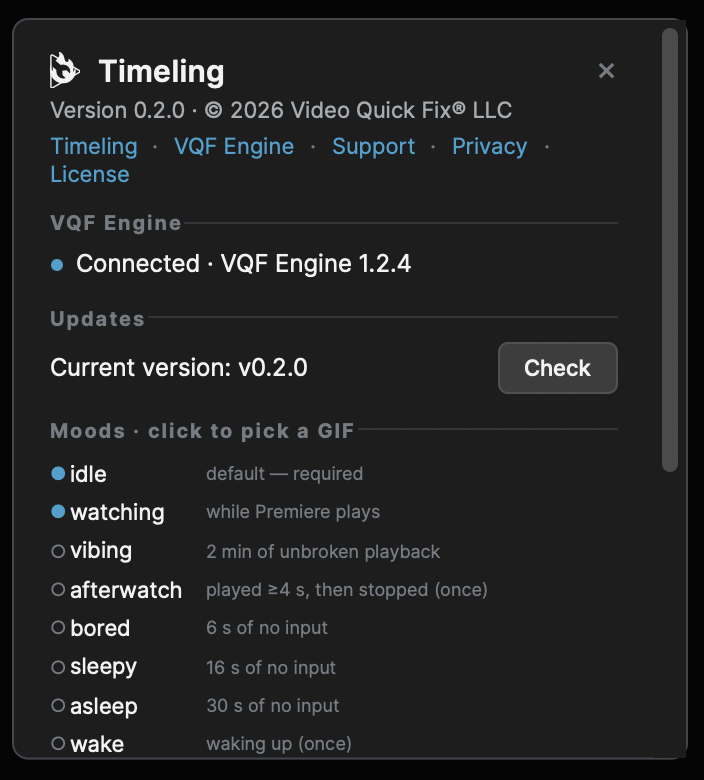
Click ? in the panel. Every mood is listed with what triggers it. Click one, pick a GIF, done — it plays the next time that mood comes up. Cats encouraged.
- idlethe default, between everything else
- watchingwhile Premiere plays
- vibing2 min of unbroken playback
- afterwatchplayed 4 s, then stopped
- bored6 seconds of no input
- sleepy16 s of no input
- asleep30 s of no input
- wakeyou came back
- markerthe moment you drop a marker
- dizzy6 transport hits in 3 s
- latenightmidnight to 4 am
- loudmix above −1 dBFS for 3 s
- mutedplaying but silent
- coffee9:00–9:30 am
- wine9:00–9:30 pm, not playing
- sneezerare, at random
- dazedfirst launch after a crash
Two installs. Then press play.
- Quit Premiere, then install the VQF Engine (free, Mac and Windows) from its page. Premiere only finds new plugins when it starts, so install with it closed. Then restart your computer.
- Open Premiere and add the engine: Settings → Control Surface (Mac) or Edit → Preferences → Control Surface (Windows) → Add → VQF Engine → OK. Then quit and reopen Premiere once more — the engine starts with it.
- Install the panel: double-click the Timeling .ccx you downloaded. Adobe Creative Cloud installs it (accept the third-party warning).
- Open it: Window → Extensions (UXP) → Video Quick Fix → Timeling. It looks for the engine, finds it, and comes alive.
Still "looking for engine"? Make sure Premiere was fully restarted — the engine starts with it. Stuck: support@videoquickfix.com.
Version 0.2.2
- Now on Windows: Timeling runs on Windows 10/11 as well as Mac
- Smoother mood changes, with no blank flash between looks
- Needs Premiere 25.6.3 or later
- On Windows, small GIFs may show a white border
- Known: Premiere doesn't support dropping a GIF straight onto the panel yet. Use the picker: ?, then a mood, then your GIF
macOS 13+ or Windows 10/11 · Premiere 25.6.3+ · VQF Engine 1.2.4+ · License · Privacy
Made by Sam Nevens, a working editor, at Video Quick Fix.
Questions: support@videoquickfix.com — you get Sam, not a ticket bot.
Fair questions.
Why?
Why not?
Can I use my own GIFs?
That's the whole point. ? → a mood → pick a GIF. Any GIF, any mood. The creature we ship is just the thing that's there before you do.
Is it free?
Yes. No account, no email, no trial, nothing to buy later.
Does it need the VQF Engine?
Yes — that's how it reacts to your editing. The VQF Engine is free too, Mac and Windows, and the panel walks you through installing it on first open.
Does anything leave my machine?
An anonymous ping that the panel opened, and a check for updates. Nothing from your timeline, nothing about your project, none of your GIFs. Privacy policy.
Will it slow Premiere down?
It's a panel playing a GIF. The engine already knows what your timeline is doing; Timeling just listens.
Can I make my own character?
Next build. Character mode swaps the whole creature for one of yours, every mood and the blink included. Until then, every mood takes any GIF.
Your timeline finally
has company.
Free. No email, no account. Bring your own GIFs.